Freesbe
Coming soon

Zoho Desk tickets, in the conversation.

Freesbe's Zoho Desk app brings your help desk into chat. Alerts post new tickets, status changes, customer replies, and priority and assignment changes into the channels you pick, seconds after they happen, for every department or one. Ticket links get a preview with the status, priority and assignee, and Create Zoho Desk ticket turns any message into a ticket. It works in every Zoho data center.

  • New tickets, status changes and customer replies, seconds after they happen.
  • Each department to its own channel, like Billing to #billing.
  • A customer's reply quoted on the card, with an Open in Zoho Desk button.
  • Previews under ticket links, with the subject, status, priority, contact and assignee.
  • Create Zoho Desk ticket turns any message into a ticket, with its card in the thread.

For Support teams that run on Zoho Desk.

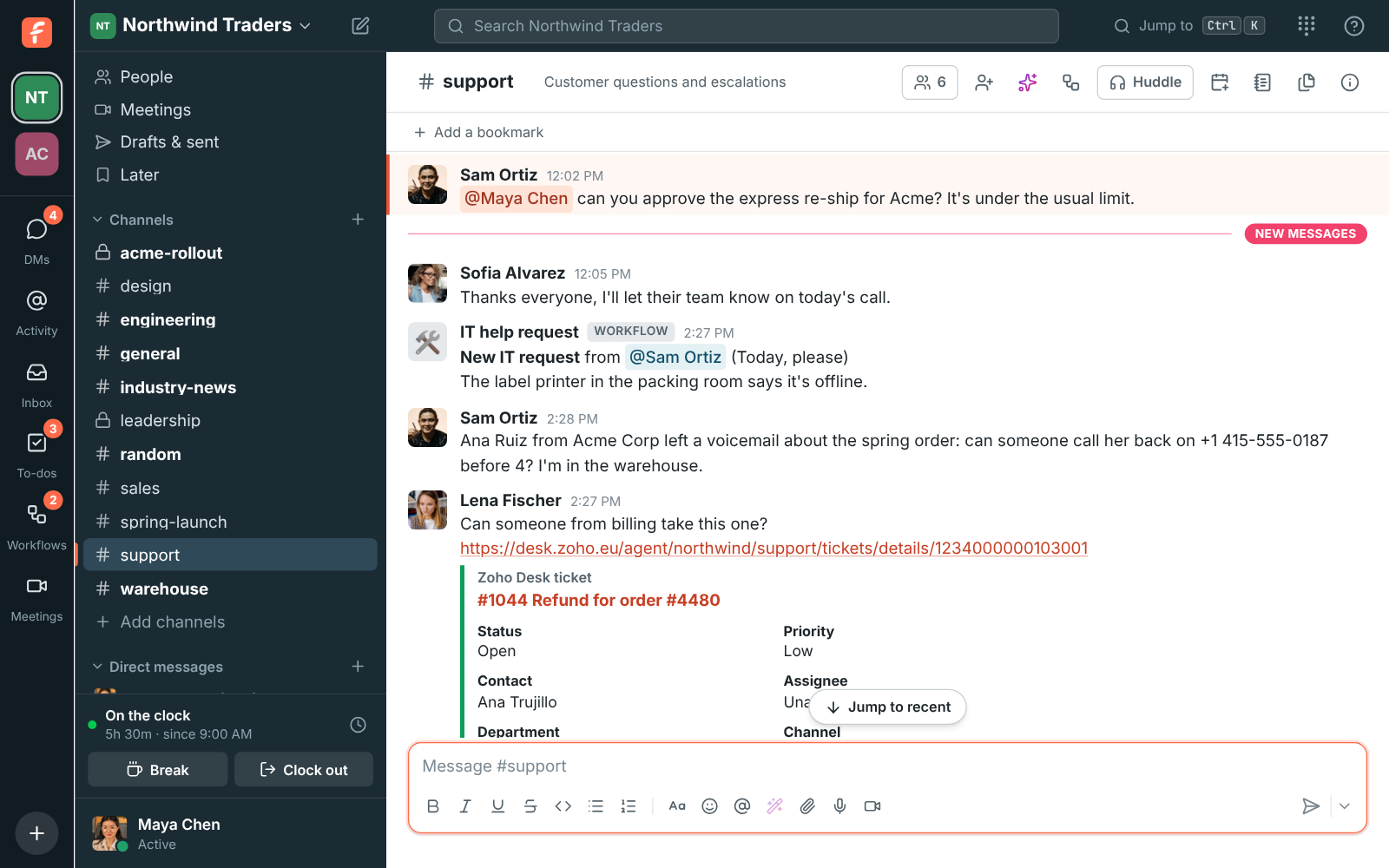
#support with Zoho Desk alerts for a new ticket and a customer's reply, and a ticket link with a preview

Ticket alerts in the right channel

Pick a channel and what to post: new tickets, status changes, customer replies, priority changes and new assignees. Send each department to its own channel, like Billing to #billing. Your agents' answers and private comments stay in Zoho Desk.

  • Each card shows the status, priority, contact, assignee and department
  • A customer's reply is quoted on the card
  • An Open in Zoho Desk button on every card
Previews under ticket links

Paste a link to a ticket and everyone in the conversation sees its subject, status, priority, contact and assignee, without opening Zoho Desk. Admins can turn previews off.

See it on your own team's data.

Start free with up to 10 people and try it today, or book a 20-minute demo with the people who make Freesbe.

Turn a message into a ticket

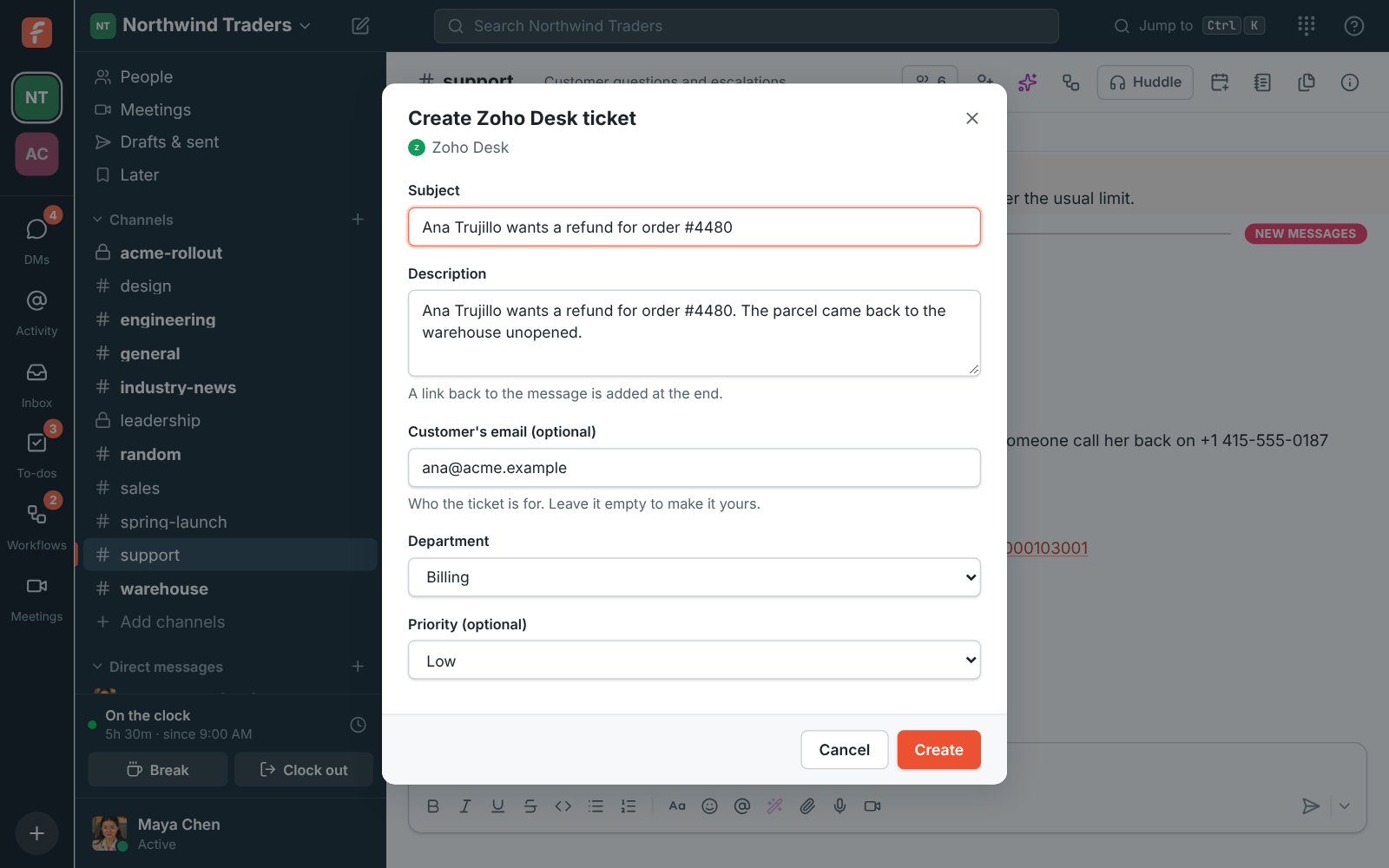
Choose Create Zoho Desk ticket from any message's menu. The subject and description come from the message, you put in the customer's email and pick the department and priority, and the ticket's card shows up in the thread.

Create Zoho Desk ticket: the subject, description, customer's email, department and priority

Plans and pricing

Zoho Desk is built and on its way. When it's on, it comes with every plan, including Free.

  • FreeUp to 10 people
  • BusinessUp to 500 people
  • CorporateUp to 2,500 people
  • EnterpriseOver 2,500 people

Questions

Do we need to set up a webhook in Zoho Desk?
No. Connecting as a Zoho Desk administrator adds the webhook Freesbe needs, and disconnecting removes it.
Does it work with our Zoho data center?
Yes. Freesbe works with every Zoho data center, including the United States, Europe, the United Kingdom, India, Australia, Japan, Canada and Saudi Arabia, and calls Zoho Desk in your own data center only.
What can Freesbe see and change in Zoho Desk?
It reads the tickets and departments that the person who connected it can see, adds one webhook, and makes a ticket when someone chooses Create Zoho Desk ticket. It doesn't change or delete anything else.

Bring your tools, and your team.

Free for up to 10 people, no card and no time limit. Connect what you already use in an afternoon.