Freesbe
Corporate and up

Fix it on their screen, with their say-so.

A support session is a call made for helping someone outside your workspace. One click gives you a one-hour link and a code to read out. The customer joins from a browser without an account, shares their screen, and from the Freesbe desktop app lets you control it, after a window that names you and your company. Sessions are recorded.

  • Start helping in one click: a link, a code and a waiting room nobody gets past without you.
  • See the problem instead of hearing it described.
  • Take the mouse when talking them through it isn't enough, with permission asked every time.
  • Keep a record: every session is recorded, and the exact words the customer agreed to are kept.

For Support and onboarding teams who help customers on their own computers.

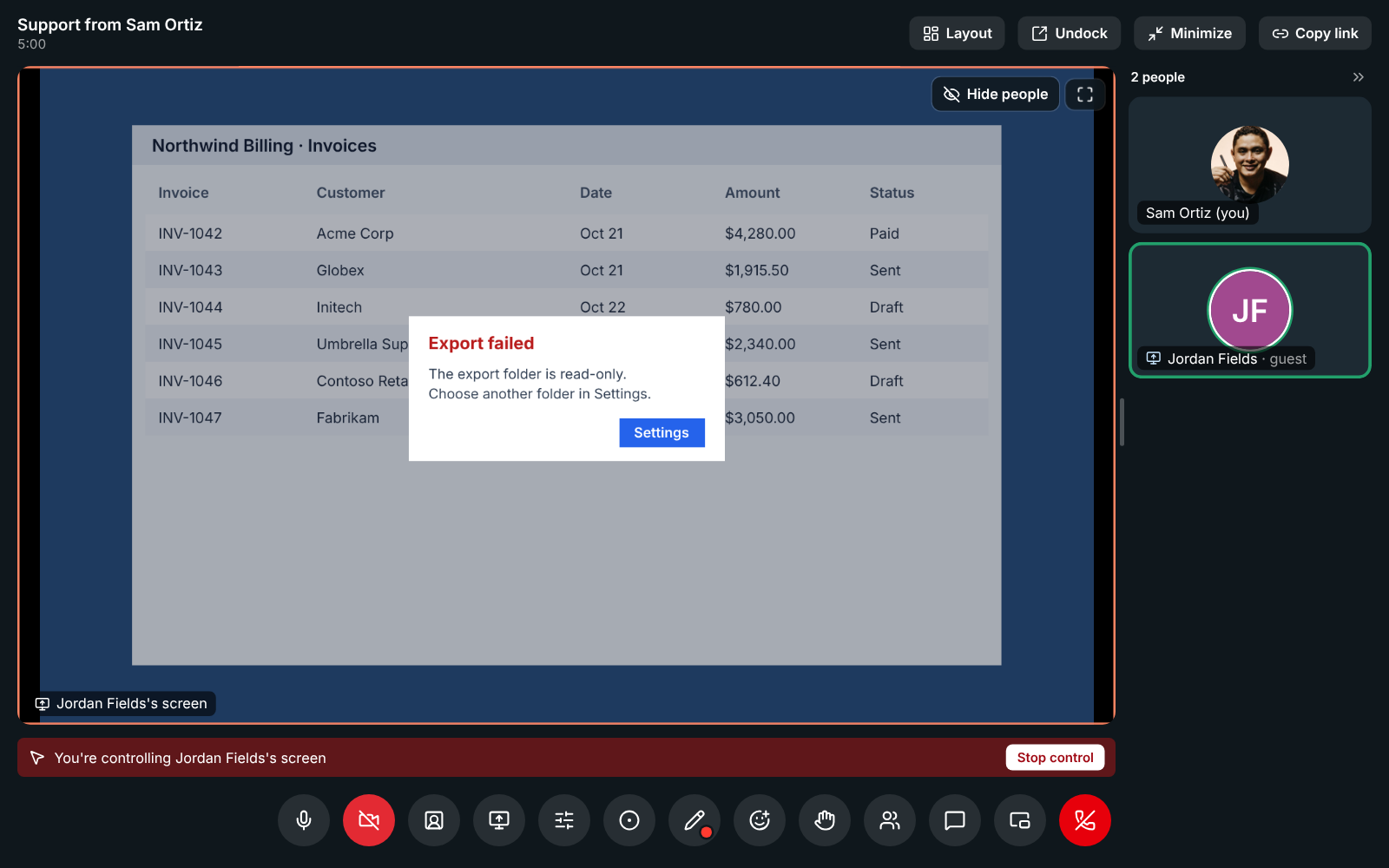
Sam Ortiz controlling Jordan Fields's screen in a support session, with Stop control

A link, a code and a waiting room

Open Meetings and click Support session. You get a link to send by email or chat, and a code to read out over the phone; the customer types it at app.freesbe.net/join, capitals and dashes don't matter. The session works for an hour from when you start it and has a waiting room: the customer knocks and you click Admit. It shows in your meetings list with a Support badge.
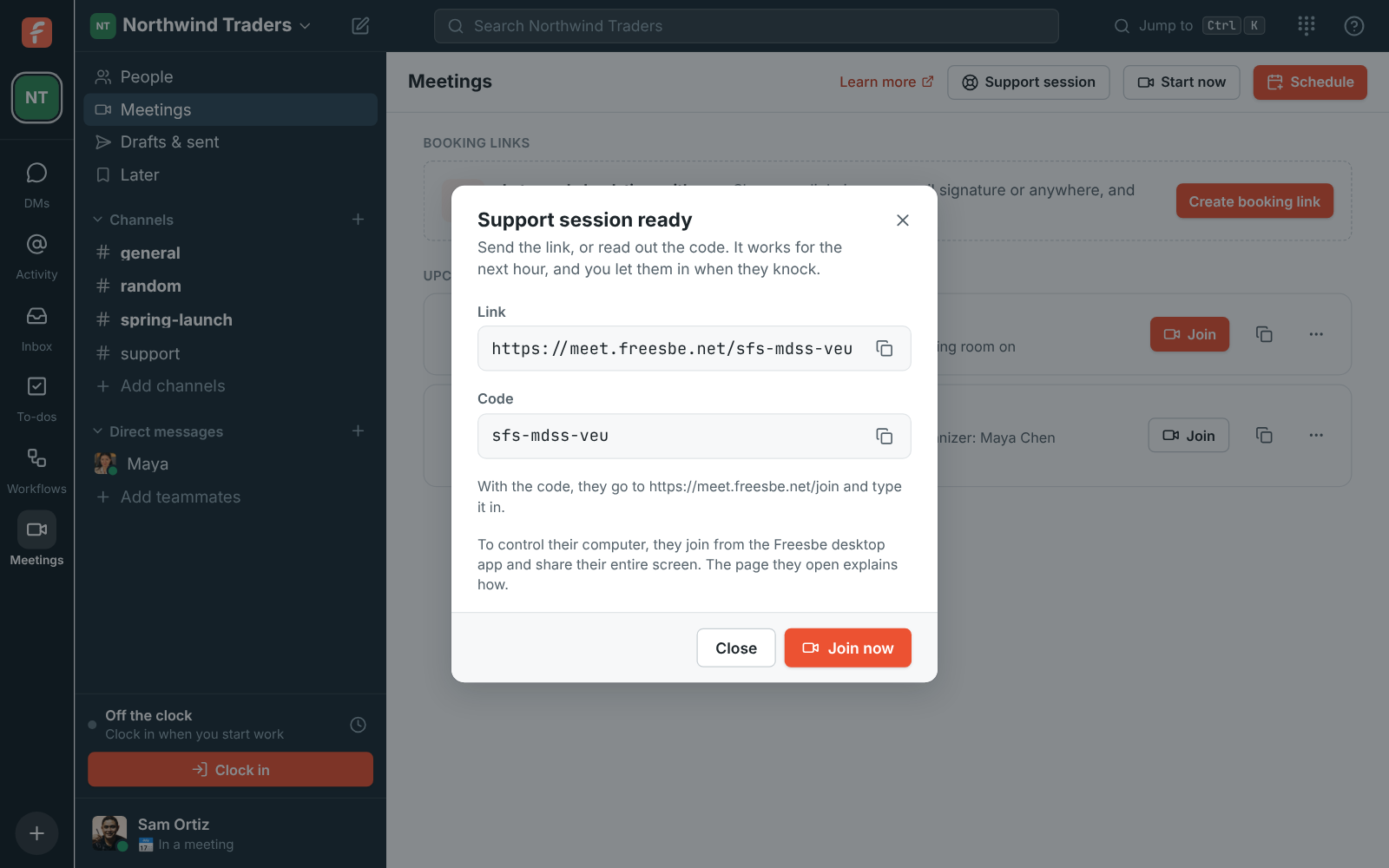
The Support session ready dialog with the link, the code and Join now

What the customer sees

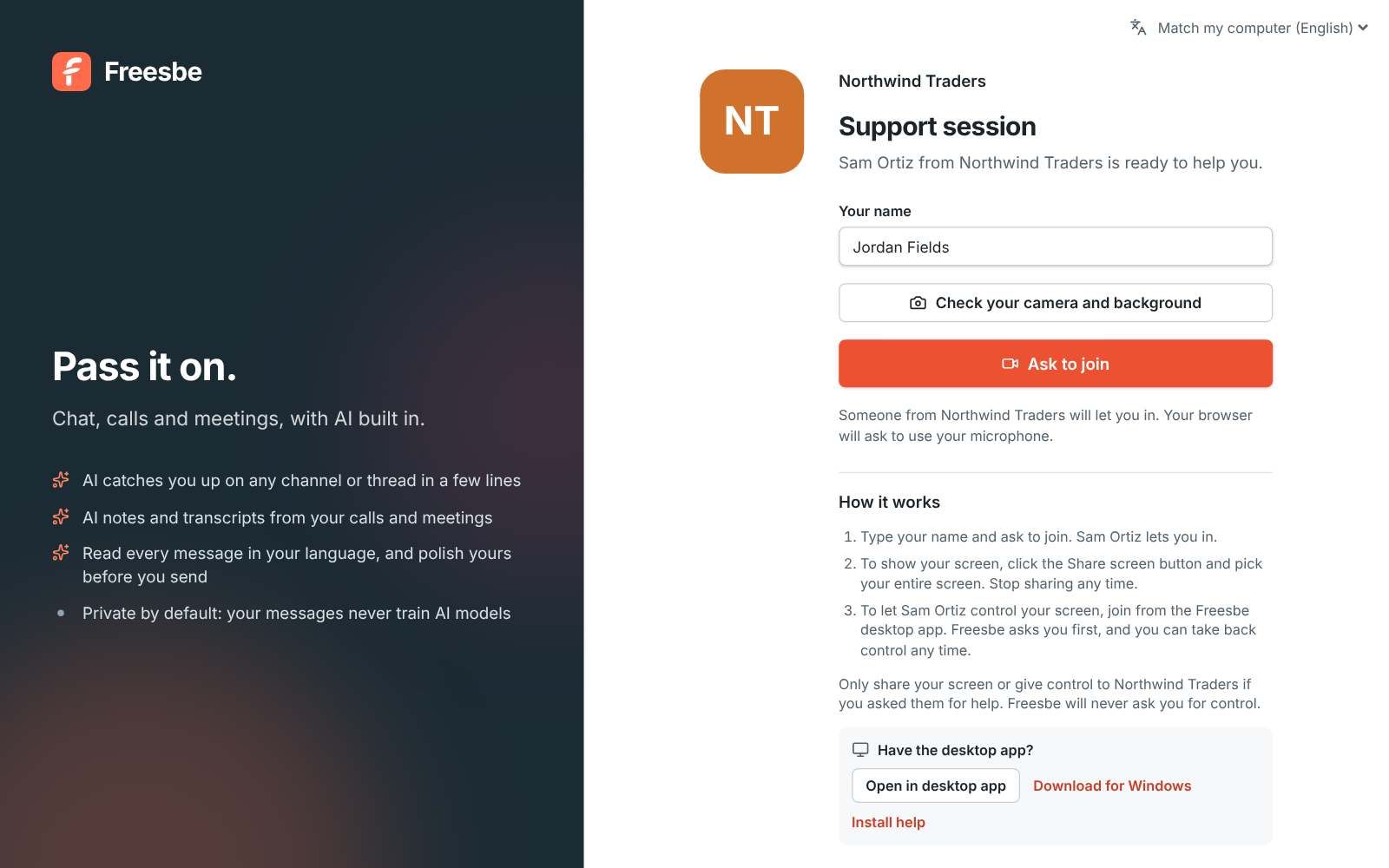
The link opens a page with your workspace's name and logo, who is helping them and the steps. They type their name and ask to join. Once in, they click Share screen and pick their entire screen, which takes the big spot in the call. To let you control it, they open the link in the Freesbe desktop app; the page has Open in desktop app and a download link. Customers on Android join from the Freesbe app and share their screen so you can talk them through it.

The customer's page: Northwind Traders, Support session, Sam Ortiz from Northwind Traders is ready to help you, a name field and Ask to join

See it on your own team's data.

Start free with up to 10 people and try it today, or book a 20-minute demo with the people who make Freesbe.

Consent that stops support scams

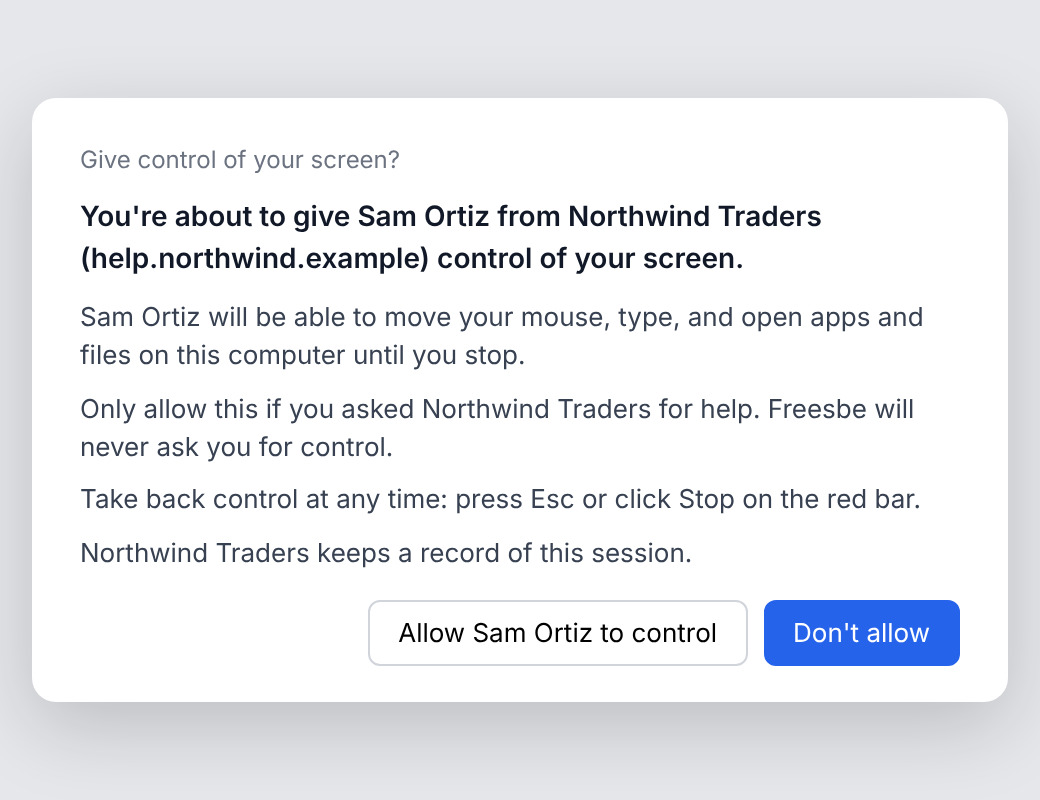
Click Request control and the customer's desktop app asks in a system window a web page can't draw or click. It names you and your company, says what you'll be able to do, and tells them to allow it only if they asked your company for help, because Freesbe never asks for control. Don't allow is the default button. While you're in control, a red bar names you, Esc takes control back at once, and when it ends they're told who had control and for how long.

The desktop app asking: You're about to give Sam Ortiz from Northwind Traders control of your screen, with Allow and Don't allow

Recorded, logged, and the consent kept

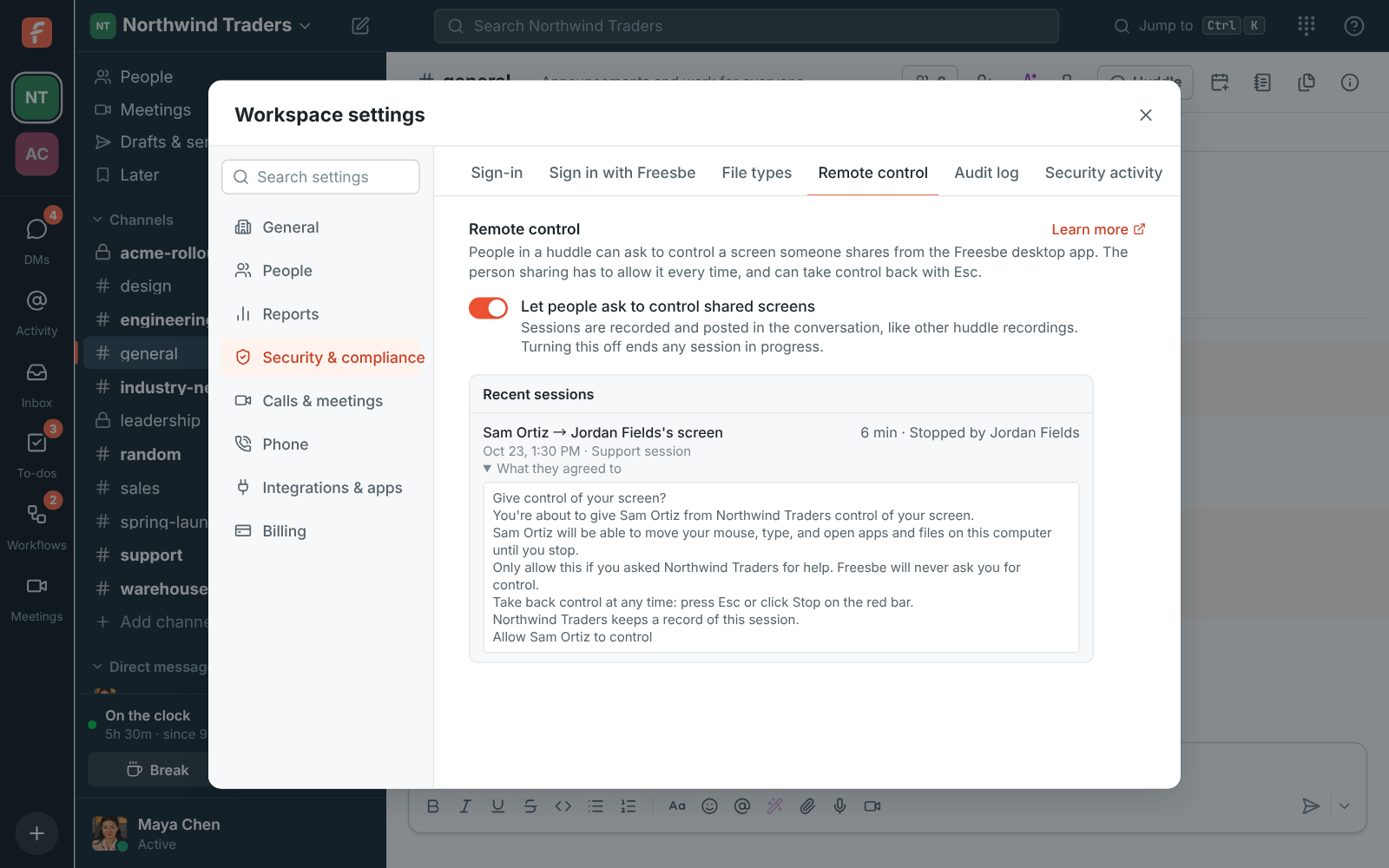
Wherever the workspace allows recordings, a support session is recorded by itself as soon as the customer is let in, and nobody can stop it until the call ends. The recording and its notes show up under Meetings. Admins see every control request in the remote control log with the customer's name and Support session next to the date, and What they agreed to shows the exact words the customer's app showed when they clicked Allow, in their language.

Recent sessions in Workspace settings: Sam Ortiz and Jordan Fields's screen, a support session, with What they agreed to open showing the consent text

Plans and pricing

Support sessions is included in Corporate and Enterprise.

  • CorporateUp to 2,500 people
  • EnterpriseOver 2,500 people

Questions

Which plan includes this?
Support sessions, and so their recordings, are part of Corporate and Enterprise. An admin turns on Remote control in Workspace settings first. Guests can't start one.
Does the customer need an account?
No. They open the link or type the code, give their name and ask to join. To let you control their computer they join from the Freesbe desktop app, still without an account.
Can I control a phone?
Customers on an Android phone can share their screen from the Freesbe app so you can talk them through it; controlling it is coming in an update. On an iPhone they can join with the code and talk with you.
What can't be done from afar?
Windows admin prompts and the sign-in screen, which the customer clicks themselves. On a Mac, Freesbe asks for Accessibility permission the first time.

Try all of it free with up to 10 people.

No card, no time limit. Invite your team and see what sticks.