Freesbe
Business and up

Every call written up: summary, decisions, action items.

Record a huddle or meeting, or just transcribe it, and a minute after it ends Freesbe gives you a transcript of who said what and notes with a summary, the decisions and the action items. Phone calls get the same. Add an action item to your to-dos, and share the notes with whoever missed it.

  • Nobody takes minutes: the decisions and action items are written for you, with owners.
  • A teammate who missed the meeting reads the notes and plays the part that matters.
  • Get notes without a video: transcribe a huddle and only the audio is used.
  • Phone calls with customers come back as a summary and action items in your DM.
  • Guests from outside the workspace can receive the notes by email, with a private link.

For Teams that meet with customers and each other and want the follow-ups to survive the call.

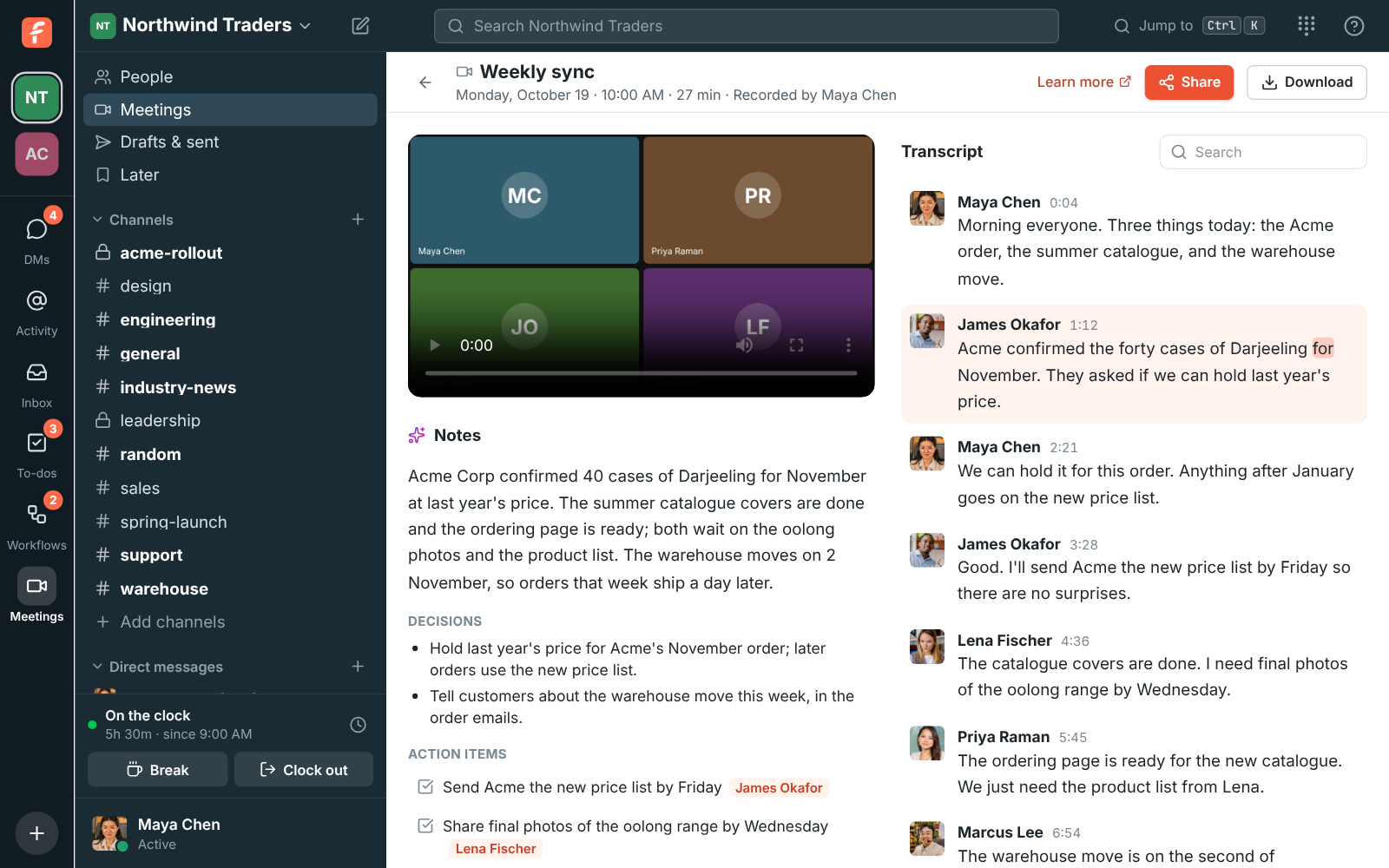
The weekly sync's recording: notes with a summary, decisions and action items, and the transcript with each person's name and the line being played highlighted

Notes and a transcript you can play

The notes are a short summary, the decisions, and the action items with who they're for; Add to my to-dos puts one on your list. The transcript says who said what, with times. Click any line to play the recording from there, or a word to start from that word, and the transcript scrolls along as it plays. Search it from the box at its top, or Download the notes and transcript as a text file. Notes are written in the language of the call.
A recording's page: the notes with decisions and action items beside the transcript, with the current word marked

Transcribe a huddle without recording it

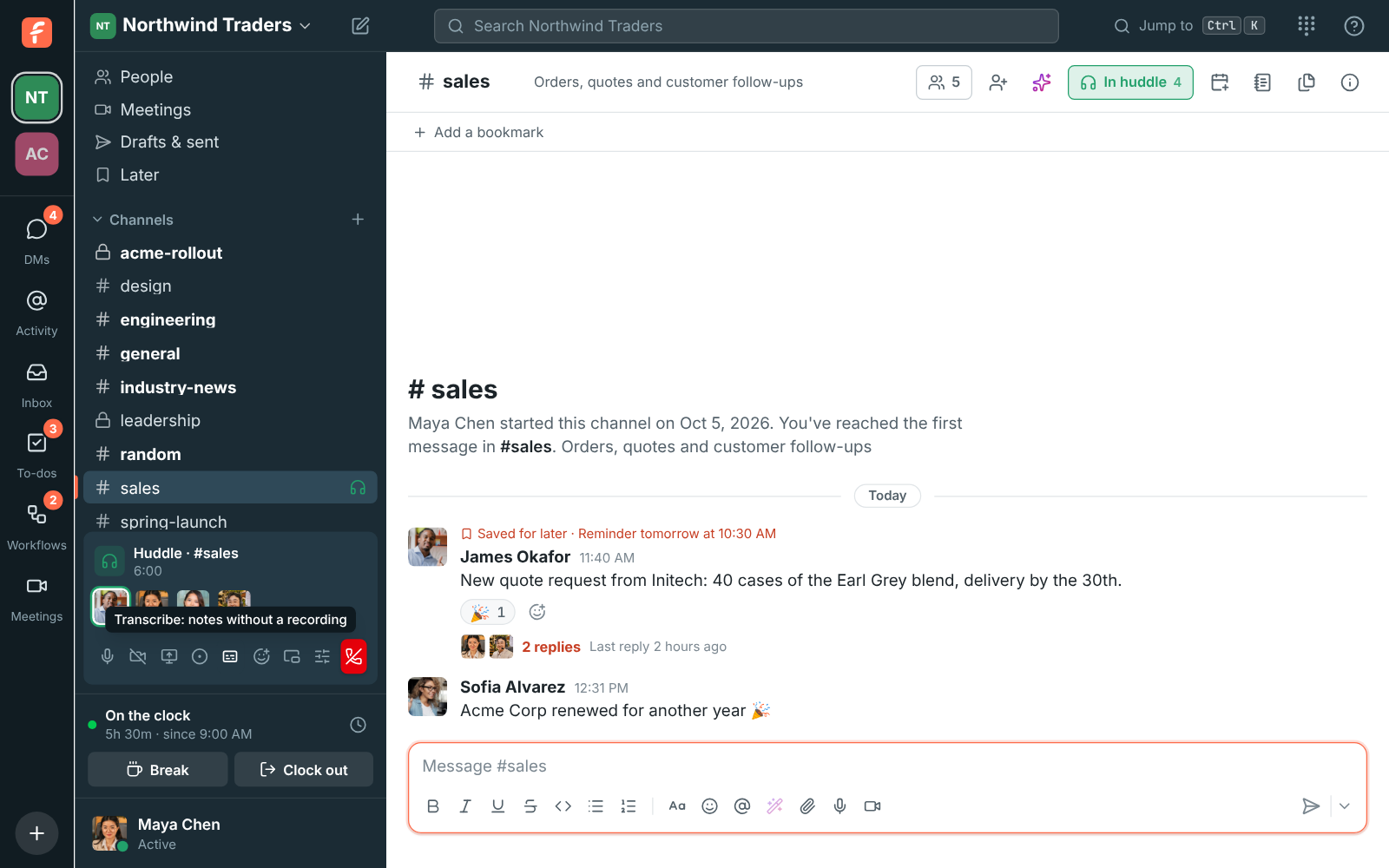
When you want the notes but not a video, click Transcribe in the huddle's controls. Only the audio is captured, to write the transcript and notes; nothing is recorded or posted as a video. Everyone hears a tone and sees a captions badge, and when it stops the notes are posted in the channel or DM a minute or two later with a link to the full transcript. Admins can have every huddle transcribed without anyone asking.

The huddle controls in #sales, with the Transcribe button's tooltip: notes without a recording

See it on your own team's data.

Start free with up to 10 people and try it today, or book a 20-minute demo with the people who make Freesbe.

Say who a speaker is

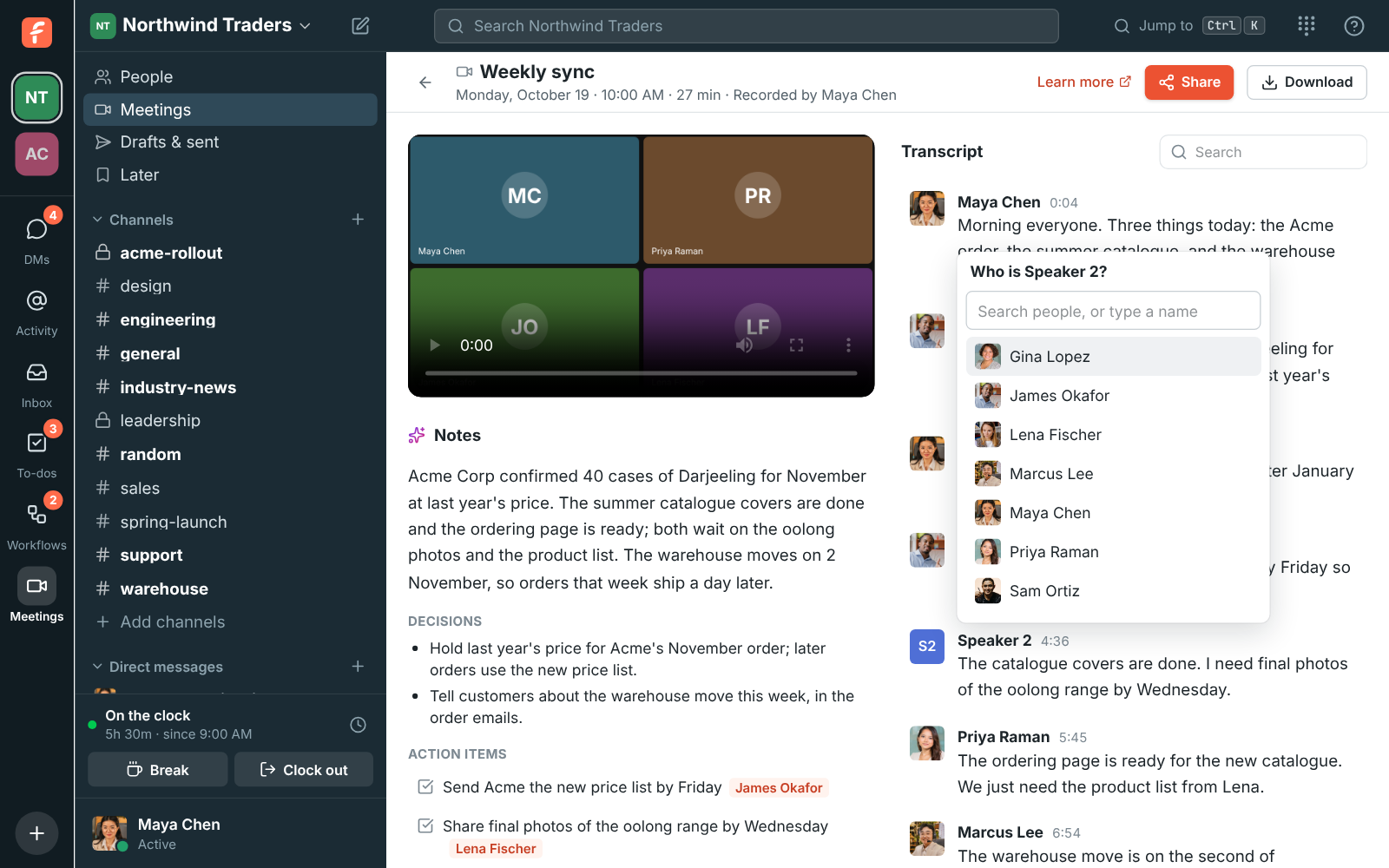
Names come from who was talking in the call at the time. A voice Freesbe couldn't match shows as Speaker 1, Speaker 2 and so on. Click the name to say who it is: pick someone from your workspace, or type a name for someone outside it, like a customer. Every line that voice said gets the new name, and so do the action items that were for it. Transcripts work in many languages, and Hebrew and Arabic read right to left line by line.

The Weekly sync recording with Who is Speaker 2? open over the transcript, listing people from the workspace

Phone calls too

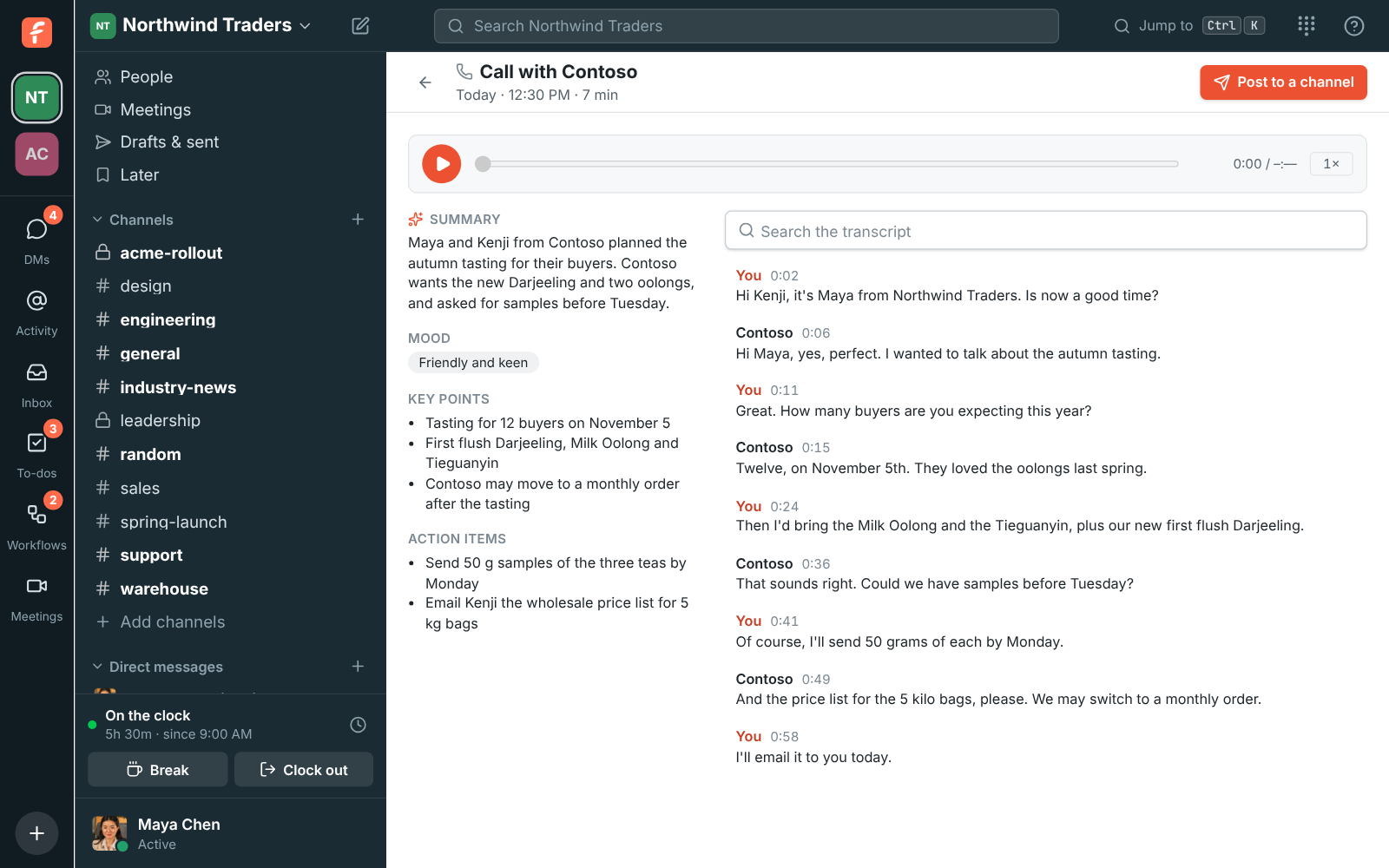
When an admin allows it, a phone call has a Transcribe button. A minute after the call ends, you and any colleagues on it get a message from Phone in your own DM: Notes from your call with Contoso, with a summary, the action items and a link to the transcript. The call's page shows the summary, the caller's mood, key points, action items and every line with the recording to play. Post to a channel shares the summary and action items with the team.

A call's notes in Freesbe: the summary, key points and action items, and every line of the call with the recording to play

Share it with the people who weren't there

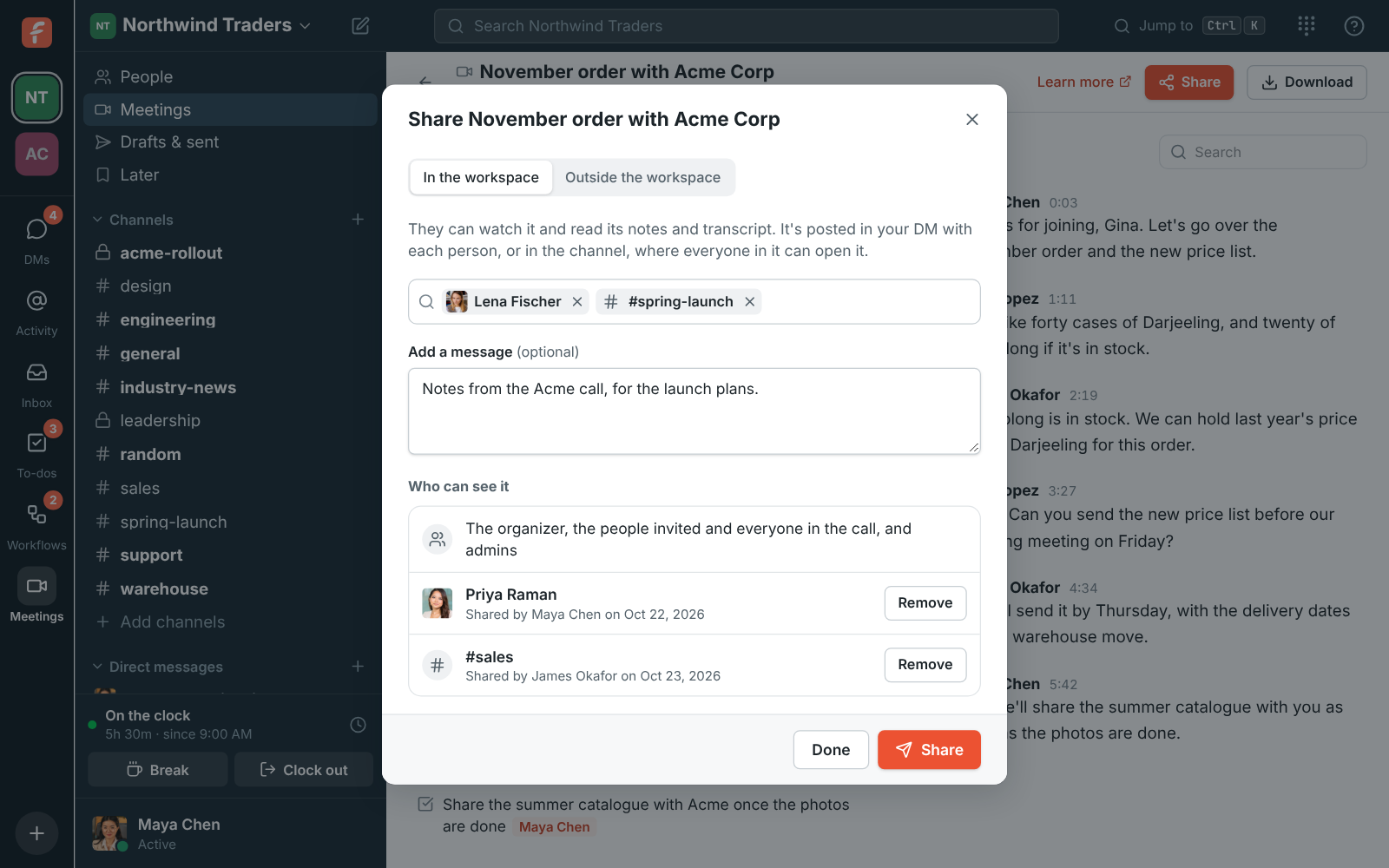
Share sends a recording to a teammate who missed the meeting or to the project's channel, as a card with the title, the length and the start of the summary. With outside sharing turned on by an admin, the organizer can email a customer a private link to the notes and transcript, working for a set number of days and revocable at any time, and meeting guests who joined with their invite link get the notes by email on their own.

The Share dialog for a recording: people and channels in the workspace picked, and who can already see it

Plans and pricing

Meeting and call notes is included in Business, Corporate and Enterprise. Each plan includes transcripts each month, growing with the plan; see /pricing/limits/.

  • BusinessUp to 500 people
  • CorporateUp to 2,500 people
  • EnterpriseOver 2,500 people

Questions

Which plan includes this?
Recordings with transcripts and notes are a plan feature; the availability line on this page follows the pricing catalog. Each plan includes transcripts each month, and the allowance grows with the plan; /pricing/limits/ lists them. When a workspace has used its transcripts, recordings are still saved and get their notes after an upgrade or next month.
What can the AI see?
The call's audio, which is sent to the speech-to-text provider to be transcribed, and the transcript, which is used to write the notes. The audio is kept for 30 days so a transcript can be tried again, then deleted, and it isn't used to train models. The transcript and notes are deleted with the recording.
Who can see a recording and its notes?
A huddle's recording: the people in the channel or DM it was in. A meeting's: the organizer, the teammates invited, everyone from the workspace who joined, and admins, plus anyone it was shared with. People outside the workspace see only a meeting's notes and transcript, on a page of their own, when someone shares it with them.
Can admins turn it off?
Yes. Admins can turn transcripts and notes off, turn recording off altogether, choose who can start and stop recordings, and set recordings to delete after 30, 90 or 365 days.

Try all of it free with up to 10 people.

No card, no time limit. Invite your team and see what sticks.