Freesbe
All plans

Your data, in a zip, whenever you ask.

Owners and admins download the workspace's messages and files as a zip in the same format Slack uses for its exports. Keep it as a backup, search it with your own tools, or import it into another Freesbe workspace. Public channels export on every plan; private channels and DMs export on Corporate, with every owner emailed when someone does.

  • Leave with everything, in a format other tools already read.
  • Pick what to export: public channels or everything, from the beginning or the last 90 days.
  • Download only after a second step, with links that last 15 minutes.
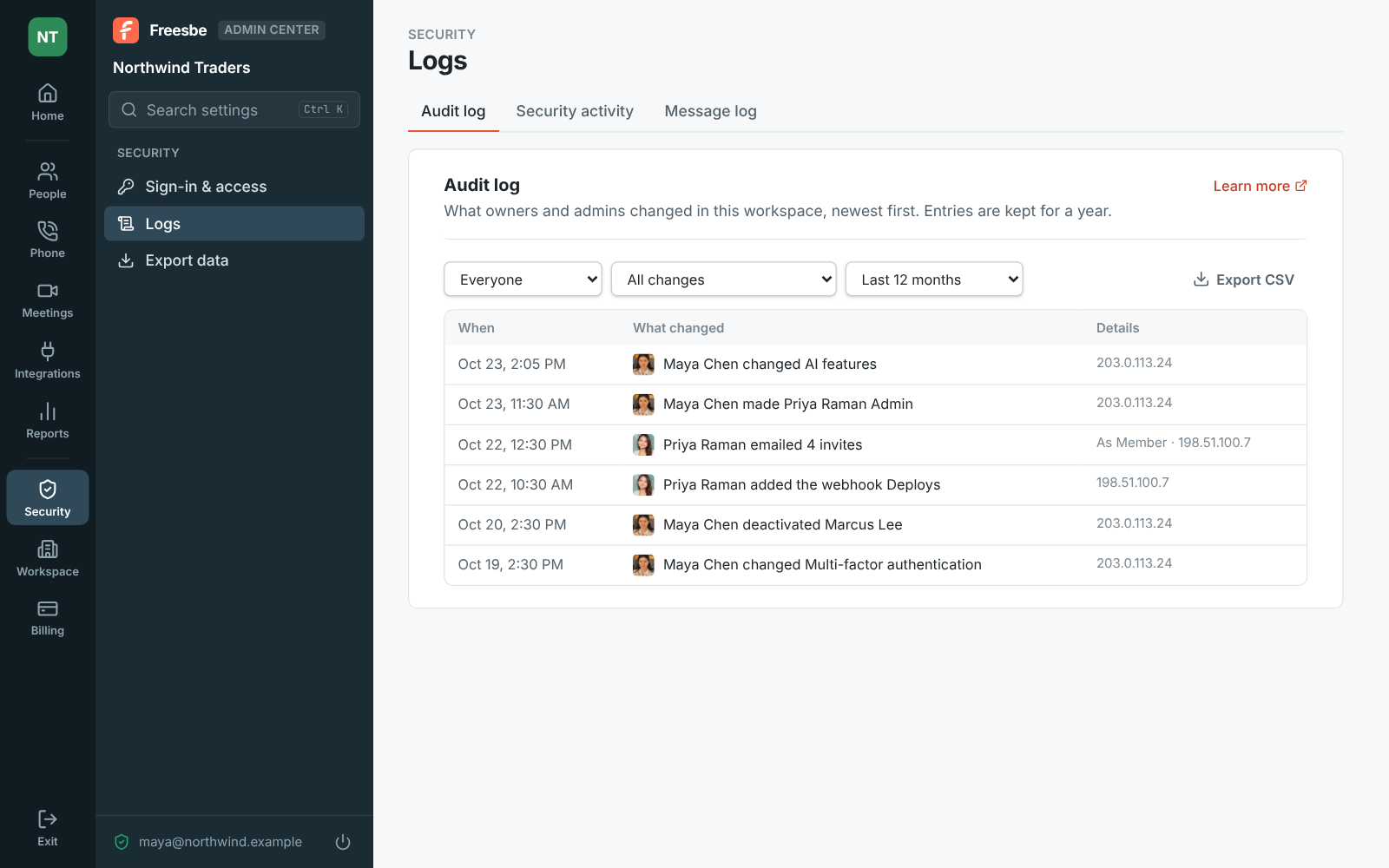
  • Know who exported what: every start and download is in the audit log.

For Admins who keep backups, answer legal requests, or are moving a workspace.

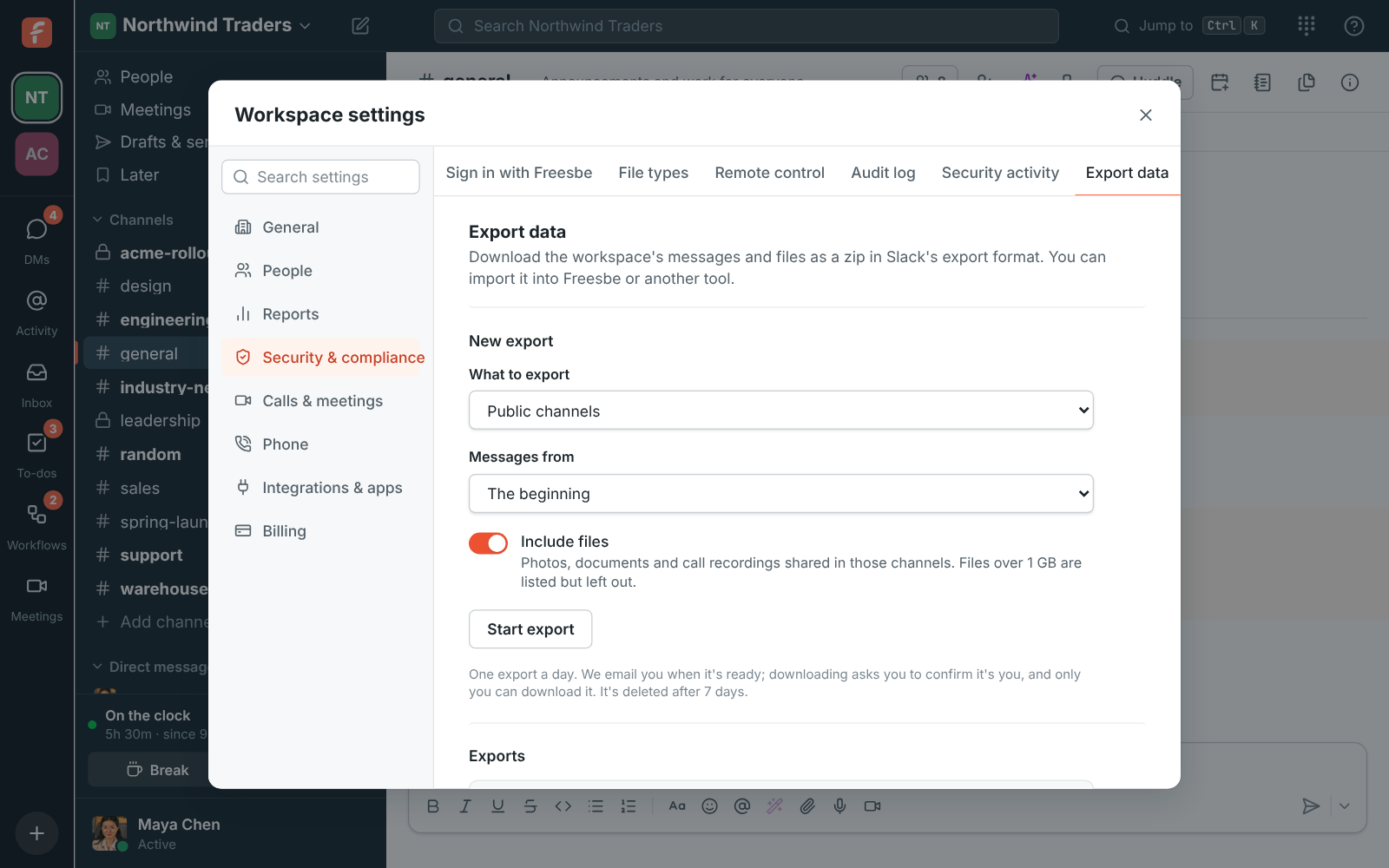
Workspace settings, Export data: a new export of public channels with files, and a ready export with its Download button

Start it, and get an email when it's ready

Under Export data, pick public channels or all channels and direct messages, then messages from the beginning, the last 12 months or the last 90 days. Leave Include files on to add the photos, documents and call recordings shared there; files over 1 GB are listed but left out. Start it and close the page: the export runs in the background, the list shows how far it got, and Freesbe emails you when it's ready. One export runs at a time, one a day.
Export data with the choices for what to export and how far back

Protected on the way out

Only the person who started an export can download it; other admins can't. Downloading asks you to confirm it's you with a passkey, an authenticator code or an emailed code unless you did in the last 15 minutes, and each link works for 15 minutes. The email has no download link, only a link into Freesbe. An export is deleted 7 days after it's ready. A big workspace's export comes in parts of up to 2 GB each.

The audit log, where exports started and downloaded are recorded

See it on your own team's data.

Start free with up to 10 people and try it today, or book a 20-minute demo with the people who make Freesbe.

Slack's format, so it goes anywhere

The zip holds users.json with everyone in the workspace, channels.json for public channels, groups.json, dms.json and mpims.json for private channels and DMs in a full export, a JSON file per channel per day with thread replies and reactions, and a files folder when you included them. Deleted messages and the lines Freesbe posts itself aren't included. Import the zip into another Freesbe workspace and people, channels, messages, threads and reactions come across.

  • A full export includes private channels and everyone's DMs, and emails every owner saying who started it
  • Export before closing a workspace, or while it's read-only
A ready export with its Download button

Plans and pricing

Export your data is included in every plan, including Free. Exporting private channels and DMs needs Corporate.

  • FreeUp to 10 people
  • BusinessUp to 500 people
  • CorporateUp to 2,500 people
  • EnterpriseOver 2,500 people

Questions

Which plan includes this?
Owners and admins export public channels on every plan, including Free. Owners export all channels and direct messages on Corporate and Enterprise. See pricing for the plans.
Can another admin download my export?
No. Only the person who started it can download it, after confirming it's them. Other admins see it in the list and in the audit log.
Does it include files?
Yes, when Include files is on: photos, documents and call recordings shared in the exported channels. Files over 1 GB are listed in the messages but left out of the zip.
Can I import it elsewhere?
Into another Freesbe workspace with Import from Slack, where people, channels, messages, threads and reactions come across; files are in the zip's files folder. Any tool that reads Slack exports reads it too.

Try all of it free with up to 10 people.

No card, no time limit. Invite your team and see what sticks.