Freesbe
Coming soon

Salesforce, in the conversation.

Freesbe's Salesforce app brings opportunities, leads and cases into chat. Alerts post new opportunities, stage changes, won and lost opportunities, new leads and new cases into the channels you pick. Salesforce links get a preview with the amount, stage and owner. /salesforce finds an account, contact, lead or opportunity, and Log to Salesforce puts any message on a contact's or lead's activity as a completed task.

  • New opportunities, stage changes, wins, losses, new leads and new cases in the channels you pick.
  • Previews under Lightning and Classic links, with the amount, stage and owner.
  • /salesforce finds an account, contact, lead or opportunity, with an answer only you see.
  • Log to Salesforce adds any message to a contact or lead as a completed task.
  • Nothing to build in Salesforce: Freesbe checks for changes every five minutes.

For Sales and support teams on Salesforce who want the pipeline in the channel.

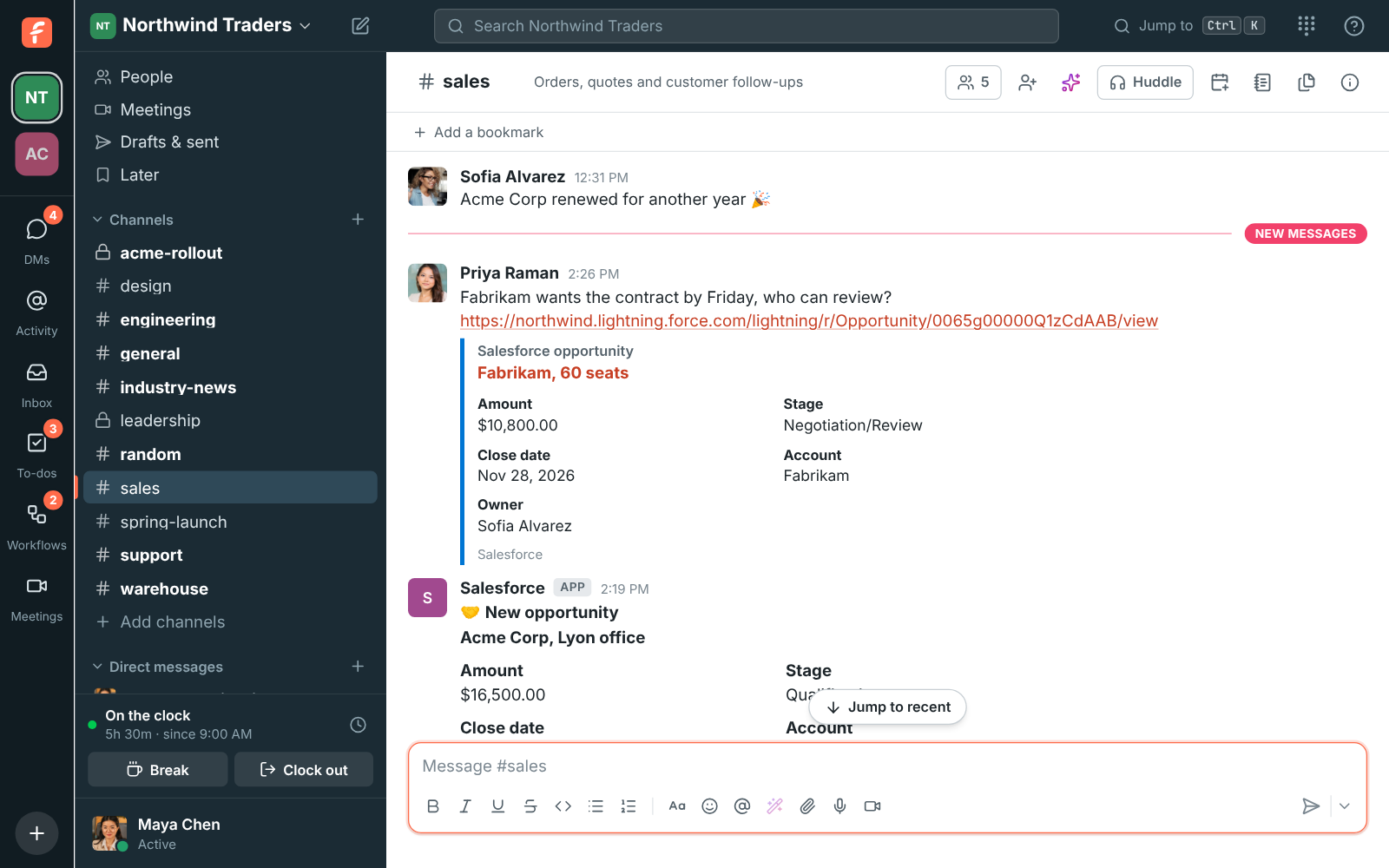
#sales with Salesforce alerts for an opportunity won and a new opportunity, and a preview under a shared Salesforce opportunity link

Opportunity, lead and case alerts in any channel

Pick a channel and what to post: new opportunities, opportunities moving stage, won or lost, new leads and new cases. Leave out small opportunities with a minimum amount, and send big ones to #leadership, new leads to #sales and new cases to #support.

  • Each card shows the amount, stage, close date, account and owner
  • An Open in Salesforce button on every card
  • Nothing to build in Salesforce: Freesbe checks for changes every five minutes
Previews under Salesforce links

Paste a Lightning or Classic link to an account, contact, lead, opportunity or case and everyone in the conversation sees its name and key details, without opening Salesforce. Admins can turn previews off.

See it on your own team's data.

Start free with up to 10 people and try it today, or book a 20-minute demo with the people who make Freesbe.

Look records up and log conversations

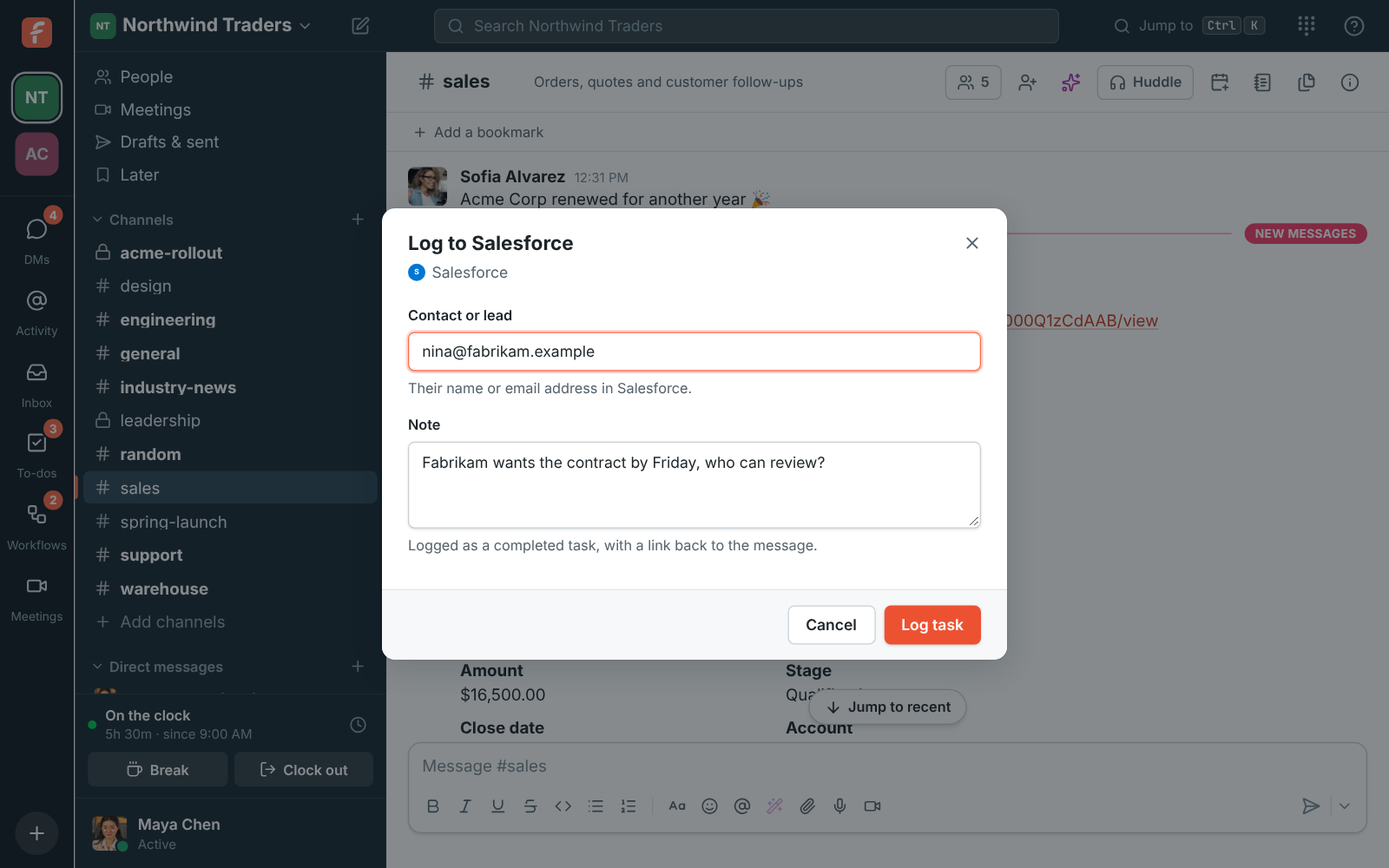
Type /salesforce and a name, email address or opportunity to find it, with an answer only you see. Choose Log to Salesforce on any message to add it to a contact's or lead's activity as a completed task, with a link back to the message.

Log to Salesforce: the contact's email address and the note

Plans and pricing

Salesforce is built and on its way. When it's on, it comes with Corporate and Enterprise.

  • CorporateUp to 2,500 people
  • EnterpriseOver 2,500 people

Questions

Which plans include the Salesforce app?
Corporate and Enterprise. An owner or admin connects it in Workspace settings, Integrations, CRM. Sandboxes can be connected too.
What can Freesbe see and change in Salesforce?
It reads the accounts, contacts, leads, opportunities and cases that the person who connected it can see, and creates a completed task when someone chooses Log to Salesforce. It doesn't change or delete anything else.
Does Freesbe copy our CRM?
No. Alerts and previews are made from the record when they're posted, and disconnecting deletes Freesbe's access straight away.

Bring your tools, and your team.

Free for up to 10 people, no card and no time limit. Connect what you already use in an afternoon.