
Record phone calls and get notes from them
Recording calls gives support a way back to what the customer actually said, and sales a summary with the action items the moment they hang up. This turns recording on for the right calls, writes them out, sets how long they’re kept, and shows the team where their notes land. An owner, admin or Phone admin does it in the Admin Center, on the phone system from Freesbe.
Before you start
Section titled “Before you start”In many places everyone on a call must agree to it being recorded, and Freesbe doesn’t announce recording to callers yet. Check the rules where you and your callers are, and say it in your phone menu greeting: “This call may be recorded.”
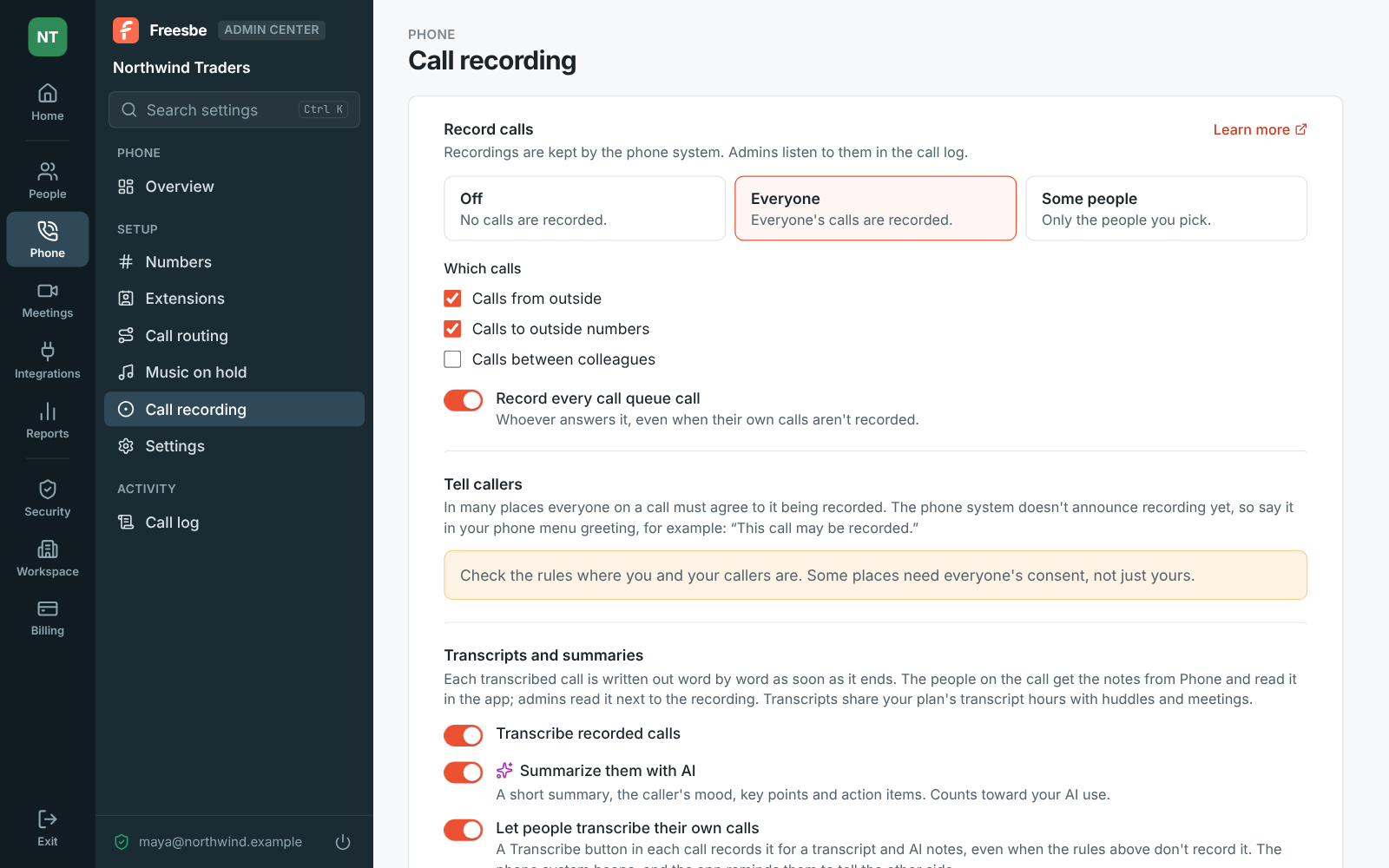
1. Choose who and what to record
Section titled “1. Choose who and what to record”- Open the Admin Center, then Phone → Call recording.
- Under Record calls, pick Everyone, or Some people and Add someone for each person. Only people with a phone line are listed. Off records nothing.
- Pick Which calls: Calls from outside, Calls to outside numbers and Calls between colleagues. Most teams leave colleague calls off.
- Turn on Record every call queue call to record every call to a call queue, whoever answers it, even when their own calls aren’t recorded.
2. Turn recordings into notes
Section titled “2. Turn recordings into notes”- Transcribe recorded calls writes each recorded call out word by word as soon as it ends, and sends the people on it the call’s notes.
- Summarize them with AI adds a short summary, the caller’s mood, key points and action items.
- Let people transcribe their own calls gives everyone with a phone line a Transcribe button during calls that aren’t recorded already, so a salesperson can keep notes on one important call without recording everyone.
Transcripts count toward your plan’s transcript hours, shared with huddles and meetings. Once those run out for the month, calls aren’t transcribed, and Phone tells whoever pressed Transcribe why.
3. Decide how long to keep recordings
Section titled “3. Decide how long to keep recordings”Delete recordings after keeps them for 30 or 90 days, 1 or 2 years, or until someone deletes them. It applies to calls recorded from then on. Pick the shortest period your business needs. Click Save.
4. Show the team where notes land
Section titled “4. Show the team where notes land”A minute or so after a recorded or transcribed call ends, everyone on it gets a message from Phone in their own DM: Notes from your call with Contoso, with a summary, the action items and a link to the transcript. The link opens the call’s page: the summary, the caller’s mood, key points, action items and every line of the call, with the recording to play. Click a line to hear it, or search for a word. A transcribed call also has a transcript button in the phone’s Recent tab.
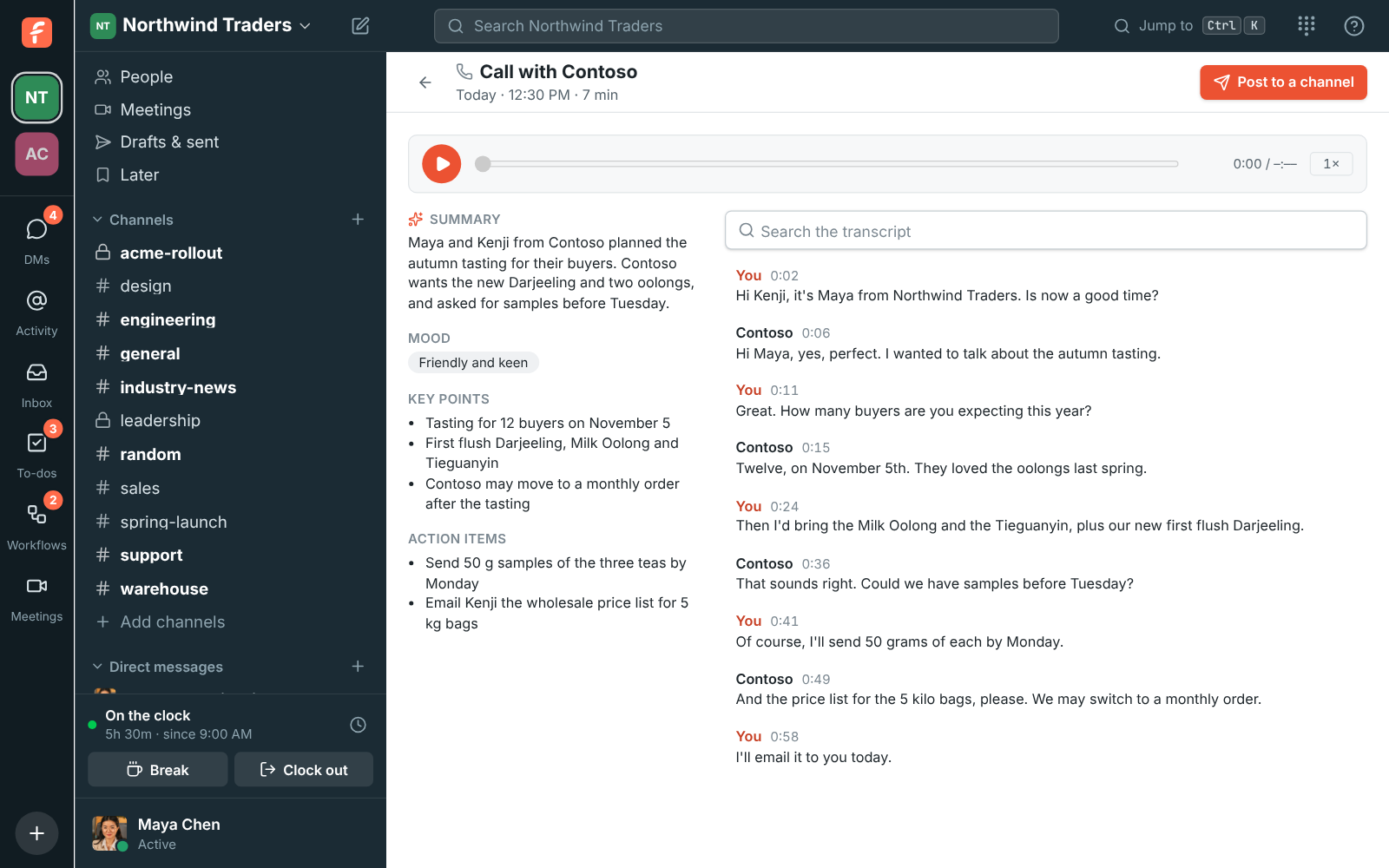
Post to a channel shares the summary and action items in a channel or with a colleague. The transcript itself stays with the people who were on the call and the workspace’s admins.
For calls that aren’t recorded, people click Transcribe under the call’s buttons; the call says Transcribing while it’s on, as a reminder to tell the other side.
5. Find a recording later
Section titled “5. Find a recording later”Every call is listed in Phone → Call log, newest first. Search by number, name or part of a number, pick dates up to 90 days at a time, and filter by direction, result, length or people. A recorded call has a play button that opens a player under it: play, pause, jump anywhere, play at 1.5× or 2×, or download. Transcript opens what was said with the summary. A recording without a transcript yet has Make a transcript, which needs transcripts on under Phone → Call recording.
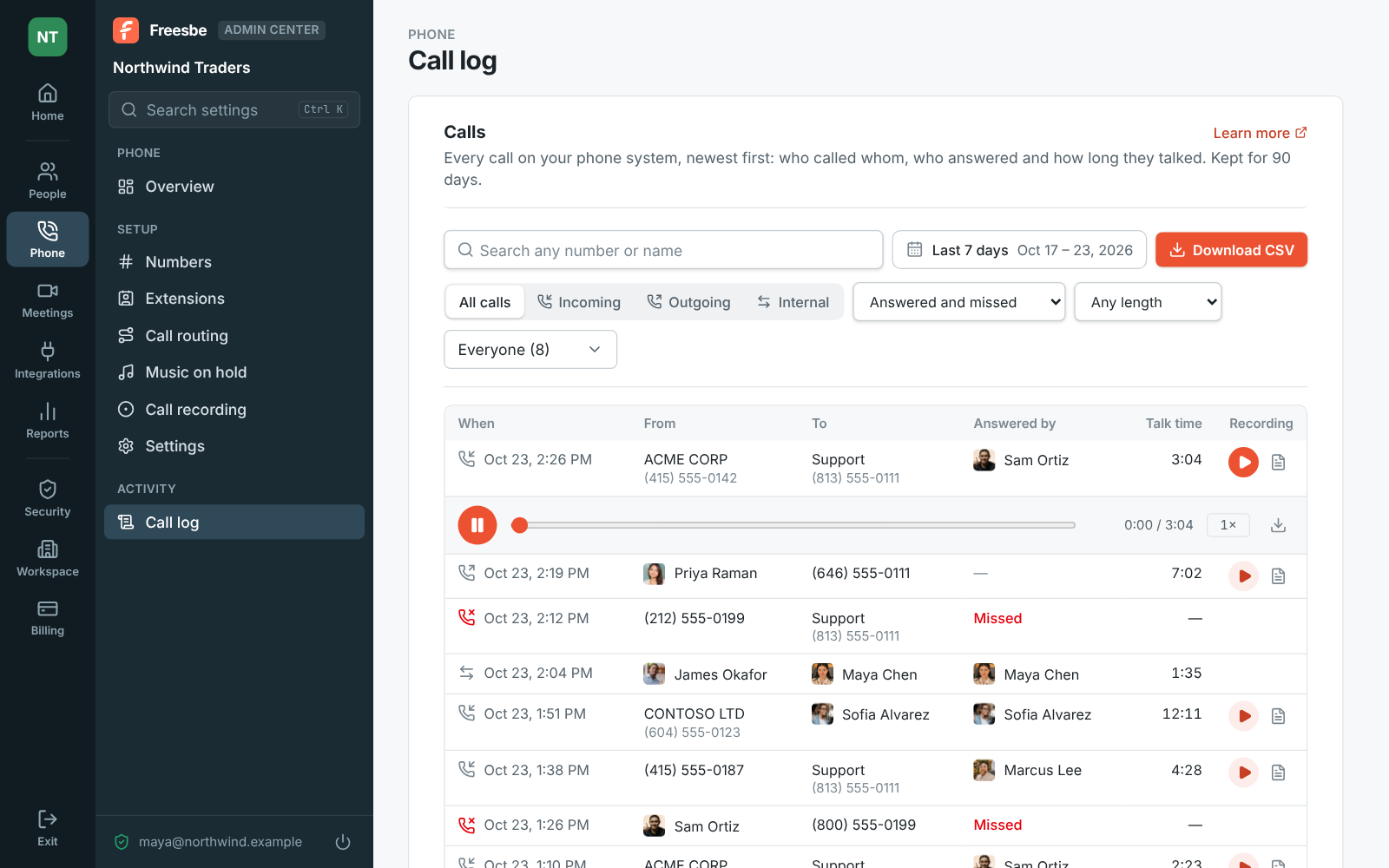
Calls show up in the log a few minutes after they end and are kept for 90 days; Download CSV saves what the filters show, up to the newest 5,000.
- Recording is per person and per kind of call. Someone recorded for calls from outside isn’t recorded on a call to a colleague unless you tick that too.
- Queue calls are a good place to start: Record every call queue call covers the support line without recording anyone’s personal calls.
- Recordings stay with the phone system, and admins listen to them in the call log. Members hear their own calls through the notes they were sent.
See Call recording, Call transcripts and the Call log for every setting.
Answers come from the Freesbe guides and are written by AI, so check the linked guide before relying on one. Please don't include personal details such as emails or passwords.